
Recipe organization
How to Digitize Handwritten Recipe Cards Without Retyping Them
A careful photo, extraction and verification workflow for preserving handwritten recipes without relying on blind automation.
Quick answer: Photograph the whole recipe card in even light, keep the camera parallel to the paper, save a high-quality image of every side, and use photo-to-recipe extraction to create a working copy. Then compare every ingredient, quantity, temperature, time and instruction with the card before cooking. Never guess at unclear handwriting.
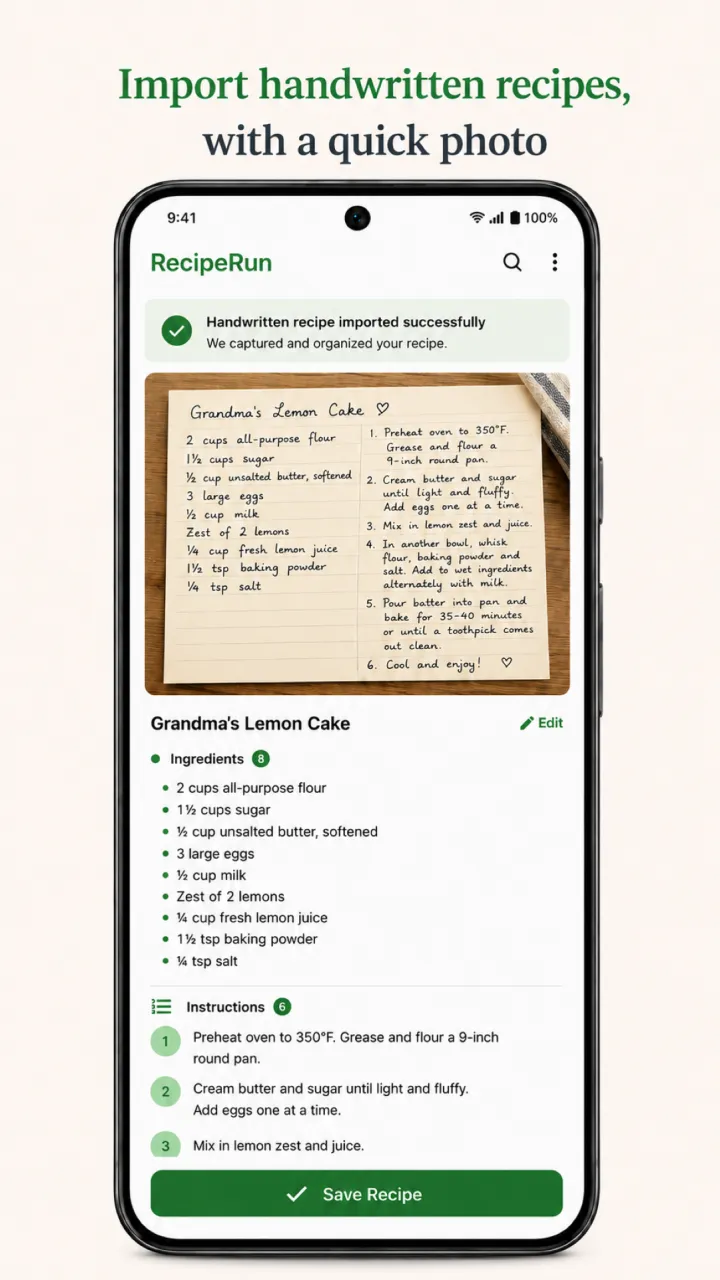
A lot of families pull out the recipe box in the weeks before Thanksgiving, when everyone wants Grandma's stuffing card and nobody wants the original passed around a busy kitchen. Digitizing a handwritten recipe has two jobs. One is preservation: keeping a faithful image of the original card and its history. The other is usability: turning the writing into a recipe you can search, plan around and add to a grocery list. An extracted recipe handles the second job well, but it does not replace a careful preservation copy.
Before you photograph the card
Check whether it is safe to handle
Place the card on a clean, dry and uncluttered surface. Handle it gently by the edges and do not force a folded, brittle or torn card flat. Remove loose dust only if you can do it without rubbing away pencil, ink or the paper surface.
The US National Archives' tips for handling family papers start with the basics: clear a clean space before you take the originals out, and wash your hands first (skip the lotion, which can stain paper). Its guidance on repairing damage says to contact a conservator if you cannot safely solve a problem with correct storage and handling, and lists rolled items that cannot be unrolled without tearing among the examples. A family recipe card rarely needs professional treatment, but the same principle applies: a flatter photo is not worth damaging the original.
Record what the image alone cannot explain
Before memories fade, note what your family knows about the recipe:
- Who wrote or used the card.
- The name your family calls the dish.
- An approximate date or occasion, if known.
- Whether notes were added by different people.
- Whether "a cup," "a can" or an oven setting had a household-specific meaning.
- Whether another card holds the missing continuation.
Keep uncertain details marked as uncertain. A question mark is more truthful and more useful than an invented date or attribution.
Confirm you may store and share it
If the recipe came from a published cookbook, a magazine or another person, the card may include copyrighted material or private family information. RecipeRun imports are for personal use, and sharing remains your responsibility. The US Copyright Office's Circular 33, "Works Not Protected by Copyright", says a mere listing of ingredients or a simple set of directions is uncopyrightable. A recipe that creatively explains or depicts how or why to do something may be protected, though, along with any photographs or illustrations that come with it. The ingredient list on Grandma's card is one thing; a paragraph she copied word for word from a cookbook is another.
How to take a clear recipe-card photo
Use even light
Photograph the card near a bright window or under diffuse room lighting. Move lamps or the card until there is no glare across glossy ink, laminated surfaces or food stains. Avoid casting a hard shadow with your phone.
Flash sometimes brings out faint pencil, but it can also create glare and blown highlights. Take a non-flash image first and inspect the smallest writing at full size. If the text is not legible, change the light or camera position rather than applying filters that could remove faint marks.
Keep the camera parallel
Lay the card flat only if it can rest safely. Hold the phone directly above it so all four edges appear as a rectangle rather than a trapezoid. Leave a small border around the card, tap to focus on the writing and hold still until the photo is captured.
A neutral, contrasting background helps you see the card's edges. For a pale or yellowed card, a darker neutral surface usually makes the boundary easier to confirm, as long as it does not add color casts or reflections.
Capture the complete object
Photograph the front and back, even if the back looks blank at first glance. Look for ingredients written in a margin, an oven temperature along the top edge, substitutions on the back and arrows that change the order of the steps.
If the card is glued into an album or stuck to another page, do not pull it free just to get a better image. Photograph it in place, or ask a conservator if the attachment hides important text; the National Archives lists original documents that are stuck together among the problems worth taking to one. If you would rather use a scanner, its digitizing tips say to make sure the original fits completely on the scanner surface and warn that automatic feed scanners are not suitable for fragile, weak, bent or valuable papers.
Inspect before putting the card away
Zoom in and check the hardest sections while the setup is still in place. Confirm that:
- Every edge and corner is visible.
- Small fractions and decimal points are sharp.
- "tsp" and "tbsp" (or a lowercase "t" and a capital "T") can be told apart.
- Temperatures and timing notes are not cut off.
- Pale pencil and crossed-out text remain visible.
- Images are the right way up and clearly named front or back.
Retake the photo immediately if any critical line is blurred. Image enhancement cannot reliably recreate information the camera did not capture.
Create a working recipe without typing every line
RecipeRun can use a photo of a handwritten card to extract a title, ingredients, serving size, cooking times and instructions. The image is sent securely for processing and may be handled by a third-party AI provider, as described in the RecipeRun Privacy Policy.
Treat the extraction as a draft:
- Open the photo-import option and choose the clearest image.
- Let RecipeRun create the structured recipe.
- Keep the original card or full-resolution image open beside the result.
- Correct the extracted fields before saving or cooking.
- Keep the preservation image separate from the working recipe.
Photo import is designed for recipe pages, cookbooks and handwritten recipes, not for private documents or general-purpose archiving.
The line-by-line verification checklist
AI can misread neat handwriting as well as messy handwriting. Fractions, abbreviations and oven temperatures deserve particular attention.
Swipe horizontally to compare
| Check | Common ambiguity | Safe response |
|---|---|---|
| Recipe title | Family nickname read as an ingredient | Compare the heading with the family context |
| Quantity | 1/2 read as 1 1/2, or a faint fraction lost | Zoom into the original; mark it unclear if unresolved |
| Unit | tsp read as tbsp, or a lowercase "t" read as a capital "T" | Compare with the same writer's handwriting elsewhere on the card |
| Ingredient | "oleo" read as "oil," or "a can" of soup with no size given | Keep the original wording unless context confirms otherwise |
| Temperature | 350 read as 250, or "moderate oven" with no number | Keep the card's wording; record any interpretation separately |
| Time | 15 read as 75, or resting time merged with cooking time | Check the numeral and its place in the method |
| Sequence | Margin arrow or "add later" note missed | Rebuild the step order from the whole card |
| Yield | "serves 6" confused with a step number | Keep servings separate from instructions |
Read the ingredients once on their own, then read the method and account for each ingredient. If the method mentions an ingredient missing from the list, do not quietly add a guessed quantity. Record the discrepancy and look into it.
Resolve old measurements without erasing the original
Family recipes often call for "a can" of cream of mushroom soup with no size, a particular coffee cup, "butter the size of an egg," oleo, a scant cup or "a moderate oven" rather than an exact modern unit. Keep the original wording in your preservation copy.
For the working recipe:
- Ask the original cook or another family member where possible.
- Look for a matching version written elsewhere by the same person.
- Record a tested interpretation separately from the original wording.
- Note the source of any conversion or substitution.
- Avoid presenting an estimate as if it appeared on the card.
If food safety depends on a temperature, time or ingredient and the card is unclear, use a current food-safety source or a reliable modern recipe rather than a guess. RecipeRun is an organization tool, and its extracted content is not medical, dietary or food-safety advice.
Preserve the story as well as the method
A perfectly formatted ingredient list can still lose what made the card meaningful. Keep a high-quality image showing the handwriting, stains, annotations and both sides. Use descriptive file names rather than the camera's numbering alone; for example, include the family name, the dish and whether the image is the front or back, as in garcia_pot-roast_front.jpg.
The Library of Congress's guidance on keeping personal digital photographs recommends giving individual photos descriptive file names and tagging them with people's names and subjects. The National Archives' digitizing tips suggest using hyphens and underscores instead of spaces in file names and adding basic who, what, where and when details. Both are written for family photos and papers in general, and the same habits keep recipe-card images understandable years from now.
Do not rely on the extracted text as your only digital record. It captures the recipe's structure, not necessarily the object's appearance or every uncertain mark.
Store the physical card after digitizing
Return the card to a stable, dry spot away from direct sunlight, the stove, steam and frequent handling. The National Archives' advice on storing family papers is to keep the temperature below 75 degrees Fahrenheit and the relative humidity below 65%, and to keep items out of damp basements, garages and hot attics. Use archival-quality materials if the card is valuable, and get specialist advice if it is moldy, badly torn or actively deteriorating.
Digitizing means you handle the original less often, but it does not stop the card from aging. It also does not guarantee the digital copy will survive. The National Archives recommends keeping your originals after you digitize them, because digital files have their own preservation risks, and suggests the 3-2-1 rule: three copies, stored on two different media, with one copy off-site. The Library of Congress adds a simple habit: check your files at least once a year to make sure you can still read them.
Privacy and AI limitations
RecipeRun photo import is convenient, but it is not offline transcription. Submitted images may be processed by third-party AI providers such as Anthropic, Google or OpenAI. RecipeRun states that uploaded photos are not used to train AI models and are not intentionally retained after processing, except where temporarily required for processing, security, debugging or legal compliance. Extracted text may be temporarily cached for up to 24 hours.
Avoid uploading images containing people, addresses, financial information, private correspondence or other sensitive material. Crop the image, or photograph the recipe separately where doing so is safe for the original.
AI output may be incomplete or wrong. You remain responsible for reviewing ingredients, allergens, quantities, times and instructions before using the recipe. See the current Privacy Policy and Terms rather than relying on this summary if the processing details affect your decision.
Organize the extracted recipes
Once each working copy is verified, give it the name your household would naturally search for and keep the family attribution where it helps tell versions apart. Add it to the same library as your website and photo recipes instead of building a separate digital attic.
The broader guide How to Organize Recipes Digitally explains how to choose a working library, keep track of sources and move recipes over in manageable batches.
RecipeRun keeps the extracted recipe in a searchable library, lets you add it to a weekly meal plan and uses its ingredients to generate a grocery list. Explore the recipe manager with grocery list, then download RecipeRun free from Google Play or the App Store.
Frequently asked questions
Can an app read a handwritten recipe card?
RecipeRun uses AI photo extraction to turn handwriting into structured recipe fields, but the result is not guaranteed to be accurate. Image quality, handwriting, abbreviations and card condition all affect what can be read. Check the result against the card.
What should I check after a recipe is extracted?
Check the title, servings, every ingredient, fractions, units, temperatures, cooking and resting times, step order and notes written in margins or on the back. Pay special attention to tsp versus tbsp and to faint numerals.
Is a phone photo good enough to preserve a recipe card?
A clear phone photo makes a useful access copy. Whether it is an adequate preservation copy depends on the card's condition, significance, image quality, file format and backup process. For irreplaceable or deteriorating material, follow archival guidance or consult a conservator.
Does RecipeRun keep my uploaded recipe-card photo?
RecipeRun does not intentionally retain an uploaded photo after extraction, except where temporarily needed for processing, security, debugging or legal compliance. The extracted recipe text may be cached for up to 24 hours. See the current Privacy Policy for complete details.
Can I discard the original once I have extracted the recipe?
Do not discard an original with personal or historical value just because the text was extracted. Keep the card safely stored and keep a separate high-quality image. The structured recipe is the convenient working copy.
Sources and disclosure
- US National Archives tips for handling family papers and photographs.
- US National Archives guidance on repairing damage to family papers and photographs.
- US National Archives guidance on digitizing family papers and photographs.
- US National Archives guidance on storing family papers and photographs.
- Library of Congress guidance on keeping personal digital photographs.
- US Copyright Office Circular 33, Works Not Protected by Copyright.
- RecipeRun Privacy Policy and Terms of Service, accessed October 9, 2026.
This guide is published by the team that makes RecipeRun. The archival sources describe family-history and preservation practices; RecipeRun's extraction feature is a convenience for creating a working recipe and is not represented as a professional preservation service.