
Meal planning
How to Combine Several Recipes Into One Grocery List Without Duplicates
A worked three-recipe method for combining ingredients into one grocery list without merging products that aren't equivalent.
Quick answer: Choose the exact recipes and servings, collect all ingredients, merge only ingredients that are genuinely interchangeable, total compatible quantities, remove food already at home, then convert the result into purchase quantities. RecipeRun generates one grocery list from recipes on your meal plan and avoids duplicates, but you should still review ingredient names, units and product requirements before shopping.
Copying ingredients is the easy part. The hard part is deciding when two lines mean the same thing and when a small wording difference matters.
The reliable six-step method
1. Confirm the recipes and servings
Don't start merging until each meal has an actual recipe and an intended yield. “Pasta on Monday” can't generate a useful list. The pasta recipe you chose can.
Check imported recipes before you plan with them. A website may leave out a quantity, and text extracted from a photo, screenshot or handwritten card can be misread. Fix those problems in the recipe instead of carrying the uncertainty into your grocery list.
2. Scale each recipe separately
Adjust each recipe for the number of portions you need before combining ingredients. This keeps the math traceable: if the weekly total looks wrong, you can go back to the individual recipe and check its yield.
Use judgment when scaling. Going from four servings to eight may double the pasta or vegetables, but seasonings, oil, pan size and cooking time don't necessarily scale the same way. Keep “to taste” and optional ingredients as notes to review rather than turning them into false precision.
3. Normalize names without losing meaning
Make obvious naming consistent:
yellow onionandyellow onionscan usually be reviewed together.2 cloves garlicandgarlic, 3 clovesdescribe compatible quantities.14.5 oz canned tomatoesand1 (14.5-oz) can tomatoesmay refer to the same purchase amount.
Don't merge just because the words overlap:
- Red onions, yellow onions and green onions can play different roles.
- Fresh spinach and frozen spinach may behave differently in a recipe.
- All-purpose flour and self-rising flour are not equivalent.
- Gluten-free, low-sodium, halal, kosher or allergen-safe requirements must not disappear during merging.
4. Add only compatible quantities
You can add quantities when the ingredient and the units are compatible. Convert units carefully where it makes sense, such as ounces to pounds. Don't add “one bunch” to “4 ounces” unless you have a reliable weight for that particular product.
Keep the recipe quantity separate from the purchase quantity. A combined list might need 29 ounces of diced tomatoes, while the purchasing decision is two 14.5-ounce cans. Both facts are useful.
5. Subtract what you already have
Check the fridge, freezer and pantry once the recipe totals are clear. Note whether you have enough, not just whether the ingredient is there. A nearly empty spice jar and a full one are not the same answer.
RecipeRun doesn't automatically know what's in your kitchen or what condition it's in. Your household needs to edit the generated list to match.
6. Review the list before you shop
Translate what's left into the package size or loose quantity you plan to buy. Check optional ingredients, substitutions, dietary specifications and anything you're not sure how to find at the store.
Worked example: three recipes, one list
Imagine a week with beef bolognese, chicken curry and bean chili. These lines are deliberately incomplete recipe excerpts to demonstrate merging. They are not full cooking instructions.
Swipe horizontally to compare
| Ingredient | Beef bolognese | Chicken curry | Bean chili | Reviewed combined requirement |
|---|---|---|---|---|
| Yellow onion | 1 | 1 | 2 | 4 yellow onions |
| Garlic | 2 cloves | 3 cloves | 1 clove | 6 cloves garlic |
| Canned tomatoes | One 14.5-oz can, diced | None | One 28-oz can, crushed | Keep the 14.5-oz can of diced and the 28-oz can of crushed separate unless the substitution is acceptable |
| Ground beef | 1 lb | None | None | 1 lb ground beef |
| Chicken | None | 1 lb | None | 1 lb chicken, in the cut the recipe specifies |
| Kidney beans | None | None | Two 15-oz cans | Two 15-oz cans, with drained weight checked if the recipe specifies it |
| Salt | To taste | To taste | To taste | Check the pantry; don't invent a numeric total |
The example shows three different outcomes:
- Direct merge: The same yellow onions and garlic can be totaled.
- Conditional merge: Diced and crushed tomatoes share a category, but texture may matter. Keep them separate unless the cook accepts the substitution.
- No merge: Beef, chicken and kidney beans stay distinct, even though each can be a recipe's main protein.
How to handle common ingredient conflicts
Different units
Convert only when the relationship is known. 1 lb and 8 oz can be totaled as 1 1/2 lb. 1 cup spinach and 6 oz spinach shouldn't be merged with a guessed conversion.
Whole items and partial items
A recipe may call for half an onion while the store sells whole onions. Total the recipe requirement first, then round the purchase quantity sensibly. Note how you'll use any likely leftover.
Cans, drained weights and package sizes
15-oz can chickpeas may refer to the net weight on the label, while a recipe can specify a drained weight. Read the recipe and the product label carefully. Two cans with the same net weight can still differ in drained contents.
Optional ingredients
Keep optional items visibly optional. Decide before shopping instead of letting every garnish and serving suggestion land on the list automatically.
Pantry staples
Oil, salt, spices and broth are often labeled “pantry staples,” but no staple is universal. Check the quantity and the use-by or best-by date rather than quietly deleting them.
Ingredient groups and headings
A recipe may use the same ingredient in both the sauce and the filling. Total both uses within that recipe before merging it with other recipes, or the weekly list can come up short.
Similar ingredients with dietary consequences
Never collapse a dietary requirement into a generic product name. If one recipe specifies a product because of an allergy or intolerance, keep that requirement on the list and check the product label when you buy it.
From a recipe total to a useful grocery item
A good grocery-list line can carry more than a noun. Depending on your household, it may need:
- Ingredient name and total required amount.
- Required variety or dietary specification.
- Purchase amount or number of packages.
- Intended recipe or substitution note.
- Preferred brand and size where that preference matters.
Add a brand only when a substitute would actually cause a problem. If every line names one, whoever is shopping can't tell which preferences matter. Either way, check the product on the shelf before it goes in the cart.
Combining recipes in RecipeRun
Save and review recipes
RecipeRun can save recipes from websites, photos, screenshots and handwritten cards. Check the ingredients and instructions after import, particularly where the text was extracted from an image.
Put the recipes on the weekly plan
Choose the day and servings. Include planned leftover meals so you don't generate ingredients for a replacement dinner you won't cook.
Generate the grocery list
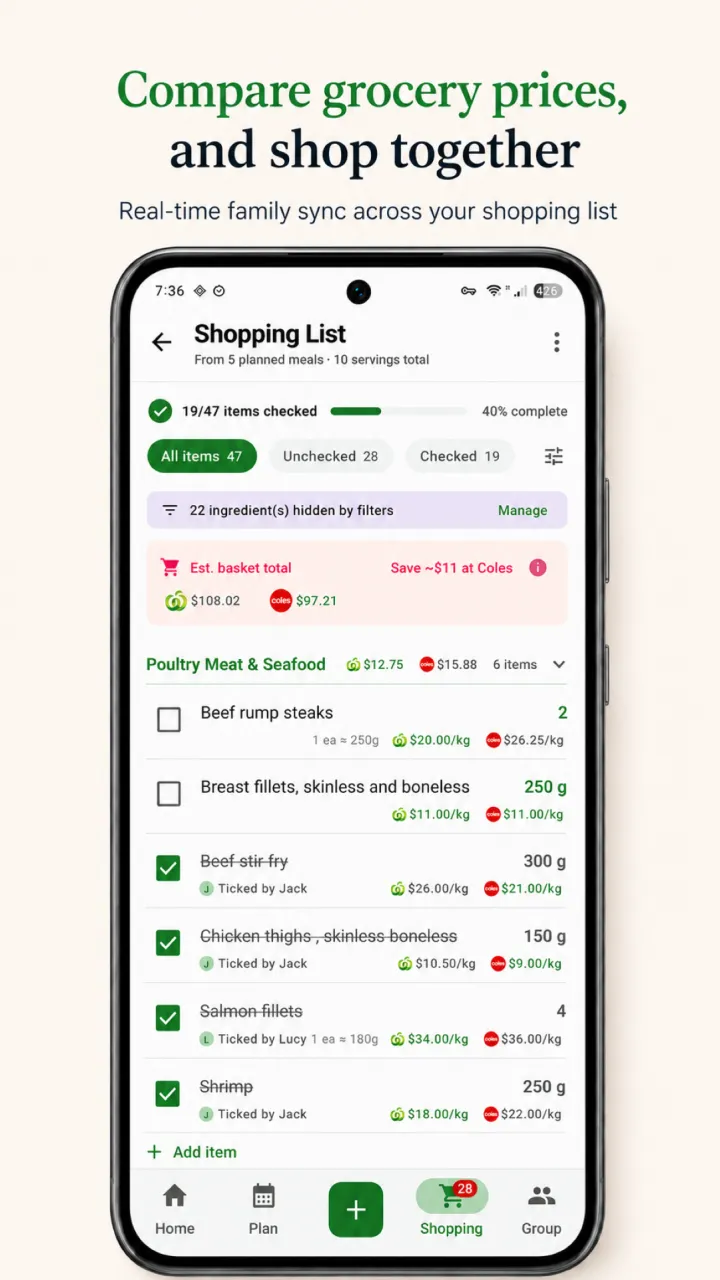
RecipeRun builds a list from the planned recipes without duplicates and updates it when the meal plan changes. Review ambiguous names and quantities, then remove items already in your kitchen.
Add everything else you need
Add breakfast, lunch, snack and household items that don't come from the dinner recipes. One complete list is more useful than a precise recipe list plus several forgotten notes.
Share the list
Family Groups can share the recipes, meal plan and grocery list with household members, including real-time list check-offs.
Continue with the full weekly meal-planning guide or RecipeRun's recipe manager and grocery-list overview.
Frequently asked questions
How do I combine grocery lists from several recipes?
Scale each recipe first, group genuinely identical ingredients, add compatible quantities, keep meaningful variants separate, subtract what's already in the pantry and convert the remainder into purchase quantities.
Can RecipeRun remove duplicate ingredients automatically?
RecipeRun generates a grocery list from the weekly meal plan without duplicates. You should still review synonyms, variants, incompatible units and dietary requirements, because recipe wording can be ambiguous.
Should I merge canned tomatoes with fresh tomatoes?
Only if the recipe allows that substitution and the cook intends to make it. They are not automatically equivalent in quantity, flavor or cooking behavior.
How do I combine ingredients with different units?
Convert units only when the relationship is reliable. Weight units, such as ounces and pounds, can usually be converted within the same ingredient. Volume, weight, bunches and individual items may need to stay separate.
What if the package at the store is larger than the recipe total?
Record the full quantity and price you pay at checkout, then plan a realistic use or safe way to store the rest. Don't count only the recipe portion as what you spent.
Build one list from the meals you chose
Save the recipes, set the servings and review the combined result before shopping. RecipeRun is free to download on Google Play and the App Store.
Disclosure
This guide is published by the team that makes RecipeRun. Ingredient merging and automatic extraction can require correction; the cook remains responsible for recipe accuracy, substitutions, dietary suitability and final product selection.